Three fixed elements: the side menu on the left, the top bar, and the working area in the middle.
What you see
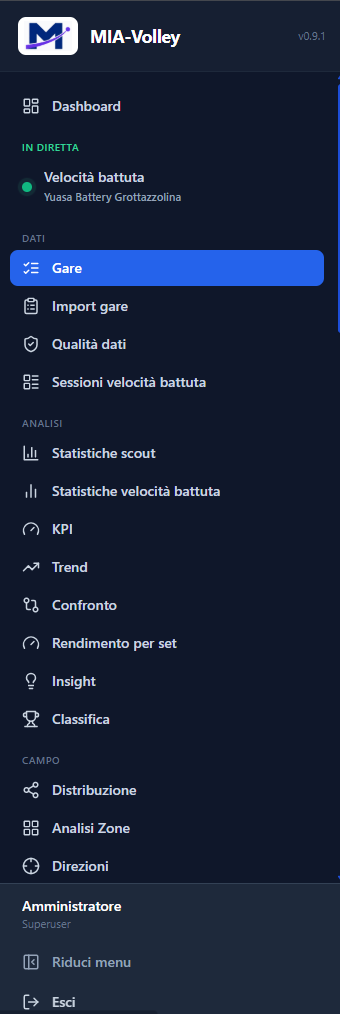
The side menu gathers the pages into groups, in the order you use them:
| group | what it holds |
|---|---|
| Live | what is happening right now; it is there only while a recording session is running |
| Data | what comes in: imported matches, import, quality, serve speed sessions |
| Analysis | the numbers: statistics, KPIs, trends, comparison, per-set performance, insights, standings |
| Court | the game drawn on the court: distribution, zones, directions, reception |
| Search | finding a single touch across all matches |
| Reports and Studies | tactical studies and printable reports |
| Video & AI | video exports and MIA Chat |
| Configuration | records and settings, grouped by area |
| Administration | users, roles and permissions |
At the top, next to the name, is the installed version number; at the bottom your name, Collapse menu — which shrinks it to icons only — and Sign out.
The top bar shows the address of the app on the network — the one to dictate to whoever is using a tablet — the notification bell and your name.
On pages described in the manual, the top bar also shows the «?».
What you can do
- Move between pages from the menu.
- Collapse the menu when you need room for a wide table.
- Read notifications from the bell and mark them as read.
- Copy the network address to set up a tablet.
- Open the help for the page with the «?»: the manual page opens in a drawer on the right, next to your work. The book at the top of the drawer opens the full manual, with the contents and the search.
Good to know
- The «Live» group appears and disappears on its own: it is there as long as a recording session is running. Its appearing is the signal.
- You don't see every entry, and that is how it should be. An entry appears only if you have the permission to use it and the licence module that contains it is active on this installation. A group with no visible entries disappears.
- If a page you used is gone, there are two causes: a changed permission, or an expired module. The Licence page says which modules are active.
- The help is in your language and inside MIA: it works without internet, and describes the version installed on your computer.