The club's teams and the ones you scout, with their rosters season by season.
Every team belongs to a club and has a type (First team, Under 19…): these two identify it, because the name changes with the sponsor.
What you see
The list of teams, and for each one the roster of the chosen season.
The list can be filtered by club. Opening a team: name, short name, club, team type, colour and logo. The colour can be «Club’s», and without a logo of its own the team shows the club's.
Two more panels in the team form: «Names by season» and «Merge with another team».

What you can do
- Create a team by hand, choosing the club (or creating a new one) and the type.
- Import a team from a DataVolley
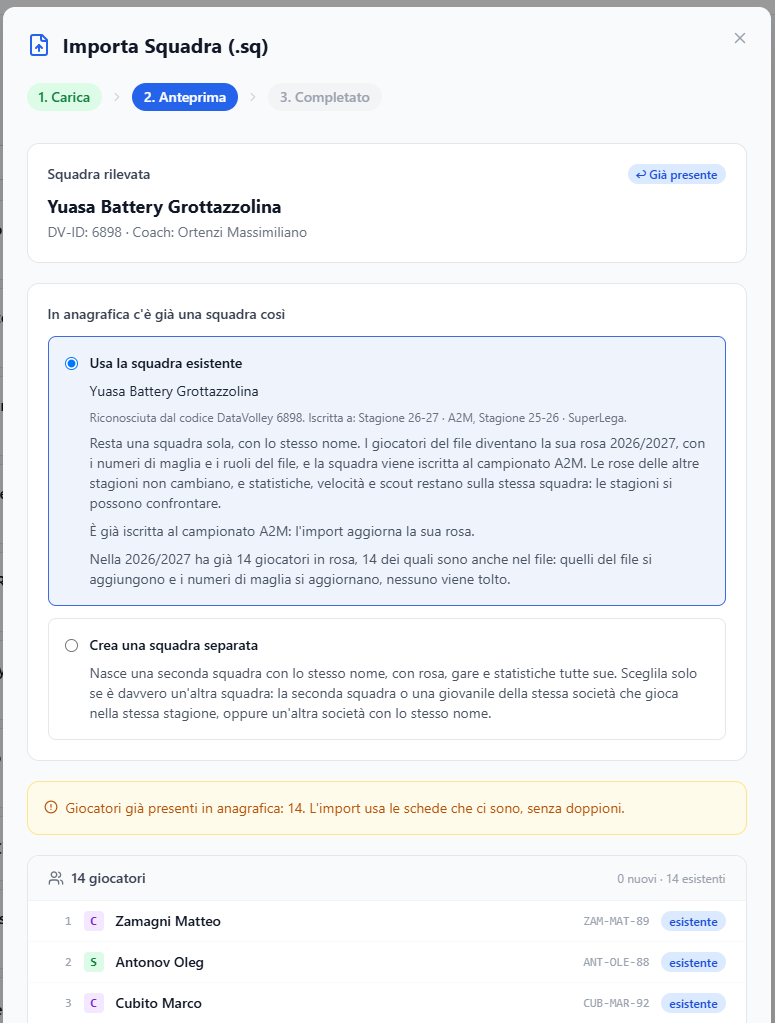
.sqfile: the procedure shows the detected team, the coach, and how many players are new and how many already exist. If the registry already has such a team — same DataVolley code, or same name even in another season — it proposes it and explains what that means; then you confirm. - Manage the roster for the season.
- Write what it was called in each season, in «Names by season».
- Merge two teams that are the same one, in «Merge with another team».
Existing or separate team
When the file has a team that is already in the registry, the box «A team like this is already in the registry» appears, with two choices:
- «Use the existing team», usually the proposal: there is still one team only. The file's players become its roster for the chosen season, with the shirt numbers and roles in the file, and the file's name becomes its name for that season. Rosters of other seasons do not change, and if it already has a roster in that season the file's players are added, without removing anyone.
- «Create a separate team»: a second team is born, with data all its own. It is for the second team or a youth team of the same club, or for another club with the same name. The procedure asks which club it belongs to — one in the registry or a new one — and the type.
Under «Use the existing team», the box says why it recognised the team — the DataVolley code or the name — and which championships it is already entered in.
Does it play the championship, or is it a guest?
The .sq import also asks «Does it play …?»:
- «Yes, enter it»: it appears among the championship's teams, in the drop-downs, in comparisons and in match sessions.
- «No, it is a guest: friendly or test»: it has the season's roster, it can be picked in friendlies and the scout import recognises it, but it stays out of the championship's teams. It is the case of a team from another league met in pre-season. It can be enrolled later, from here.
Names by season
The name changes with the sponsor. In the panel you write what the team was called in each season: that year's standings and reports use that name, and imports recognise it from there too. A season left empty uses the current name, which is the most recent season's.

Merging two teams
For two rows that are the same team, usually imported under two sponsor names. Pick the other team and read the preview: «Stays» and «Disappears», how many scout matches, and row by row what moves to the one that stays — matches, rosters, speed sessions, names by season, studies, reports. «The other one stays» swaps the roles. After the merge the team carries the most recent season's name.

Good to know
- The
.sqimport asks for the context first: without season and championship it does not know where to put what it reads. - With «Add only the new players to the roster» the players already in the registry stay as they are: anyone not already in the season's roster does not join it, and shirt numbers do not change. Useful when the external file is less up to date than your own data.
- The import recognises players even when the code in the file has changed: by code, then by surname and start of the code, then by surname and first name. It does not create a second record for someone who is already there.
- Opponent teams are also created on their own while importing a match: here you tidy up names and codes.
- A team is valid for all seasons: the roster is per season and the entry per championship, so the same team in another season is not created again.
- Sometimes the proposal is «Create a separate team»: it happens when the team found by name only already plays, in the same season, another championship with a roster that has none of the players in the file. It is probably another team of the club, and the box says so. The choice is still yours.
- The DataVolley code of the file stays linked to the chosen team: the next import or the next match with the same code finds it by itself.
- A merge cannot be undone, and it is refused between two teams that played each other: they are not a duplicate. If they belong to different clubs the window points it out; a club left without teams is deleted.
- A team still in use cannot be deleted: the page says by what — scout matches, schedule, players, training sessions — and how to free it.
- Two teams with the same name are allowed: in the drop-down lists, though, you cannot tell them apart, which is why a different name helps.