The club's canonical list of combinations. The lists of external scoutmen are mapped onto this one: each scoutman has their own recodings, that is «their X5 is our X5».
What you see
The combinations with their code and description, and on each row a checkbox to select it.
Above the list two boxes may appear:
- «Probable duplicates» — pairs of combinations with the same title, or where the title of one is already a recoding of the other. It is a hint, not a certainty;
- «Actions without a canonical entry» — attacks that carry the code written in the file but no linked combination, and are therefore missing from the statistics by combination. One row per scoutman and code.

What you can do
- Add or edit a combination.
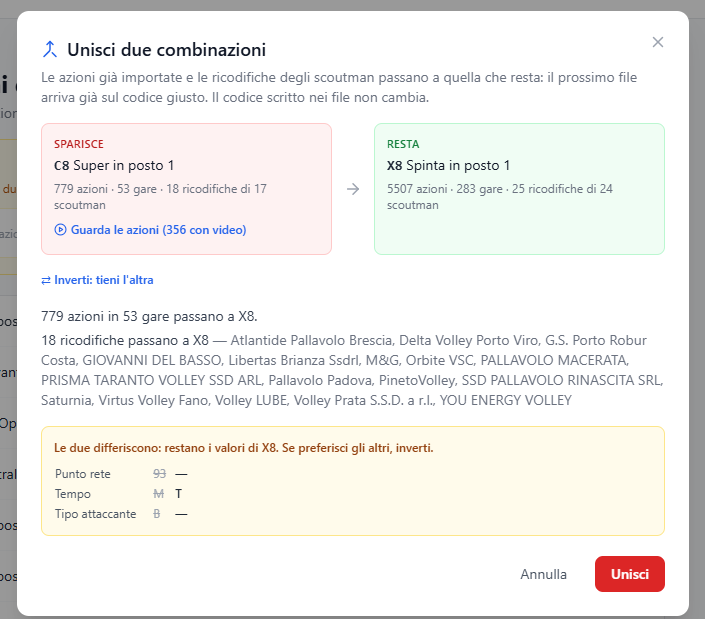
- Merge two combinations that are the same: select two and press «Merge the two selected…», or start from «View and merge…» in a probable duplicate. The window shows which one stays and which one disappears, how many actions and recodings move, and where the two differ; «Swap: keep the other one» keeps the other.
- Delete a combination with the bin. If it has actions, the window asks which other one to assign them to: nothing is left without a combination. If it only has recodings and no actions, you can assign them or discard them with it.
- Assign the actions without a canonical entry: for each row the page suggests a combination — from that scoutman's recoding, or from the identical code — and you confirm with «Assign», or pick another.
- Watch the actions before deciding, with «Watch the actions (N with video)»: the player opens on the most recent ones.

Good to know
- It is needed because files from different scoutmen use different codes for the same thing: without a reference list, the statistics by combination split into many groups that say the same thing.
- Duplicates come from imports, especially of a whole folder: faced with a new code from a new scoutman, the import may create a combination instead of mapping it onto the one that exists.
- Merging also moves the recodings: the next file from that scoutman already lands on the right combination. Reports and saved analyses that mentioned the one that disappeared update by themselves.
- Assigning the actions without a canonical entry writes the recoding that was missing: from the next file on it does not happen again. A suggestion «by identical code» must be checked: the same code can mean different things for different scoutmen.
- The code written in the file never changes: merging, deleting and assigning change which club combination the action is linked to, not how it was scouted.
- «Watch the actions» appears only if the video file is really there on this computer. It says how many actions can be seen.