For whoever records serves at courtside, often a fitness coach or a beginner scout: what to watch, what to tap, and what each outcome means.
What you see
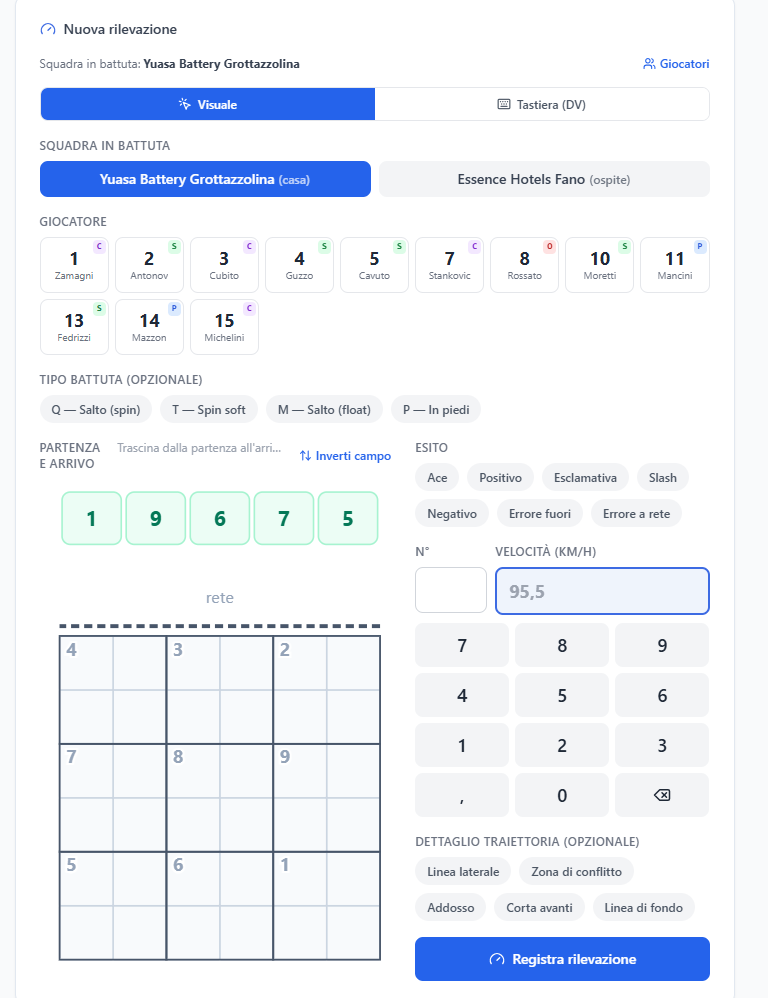
The 36-box court
The court combines the starting point and landing point in the same drawing. In the default direction, the five starting zones are at the top, followed by the net and the opponent's half. The nine landing zones read as follows:
| left | centre | right | |
|---|---|---|---|
| at the net | 4 | 3 | 2 |
| middle | 7 | 8 | 9 |
| back court | 5 | 6 | 1 |
Flip court rotates the drawing by 180 degrees to match the side you are watching from. Thin lines split every zone into four quadrants A–D. The quadrant is DataVolley's «subzone»: it says where the ball landed four times more precisely.
The outcomes
The outcome is judged from the other team's reception, always from the server's side. The form writes the meaning under the buttons as soon as you pick one.
| outcome | symbol | it means |
|---|---|---|
| Ace | # | direct point: the ball lands or the reception cannot control it |
| Slash | / | reception so poor the opponent cannot attack, or the ball comes back to our side |
| Positive | + | poor opponent reception: no quick attack, they hit a high ball |
| Exclamation | ! | fair opponent reception: the setter has to move, fewer options |
| Negative | - | good or perfect opponent reception: they can run every play |
| Out error | = | the ball went out |
| Net error | = | the ball did not cross the net |
Ace, slash and positive are the effective serves.
What you can do
- Before you start, open the session and press «Start».
- For every serve, pick the player and the type if needed; drag from the starting point to the landing point, or tap the two points; choose the outcome, enter the speed read from the radar and, if needed, the trajectory detail. Then press Record serve or Enter.
- Flip the court if you are watching from the other side: the choice is remembered on that device.
- Pick the right type: Q is the jump spin, T the soft spin (a Q with more spin and less speed), M the jump float, P the standing serve. Q and T are compared against each other; mixing them up lowers the Q average.
- Correct straight away a wrong serve from the list under the form, or move it to the bin if it should not be there.
- At the end of the match, press «Close».
Good to know
- For an error you still tap a box: it is the direction the ball was going in. For both a net error and an out error, tap the zone it was heading towards. It is not made-up data: it shows where the errors happen.
- Player, starting point, landing point, outcome and speed are required. If anything is missing, the form lists every missing field and keeps what you have already entered.
- The trajectory detail is optional, but it is the only way to know how many serves go after the conflict zone or the lines.
- A badly recorded serve can be corrected later too: nobody has to chase the game to fix it.