This is the way into all of scouting: a DataVolley .dvw file becomes a MIA match, with its sets, its rosters and its touches.
The import is a six-step wizard. You can go back: nothing is written until you confirm at the end.
What you see
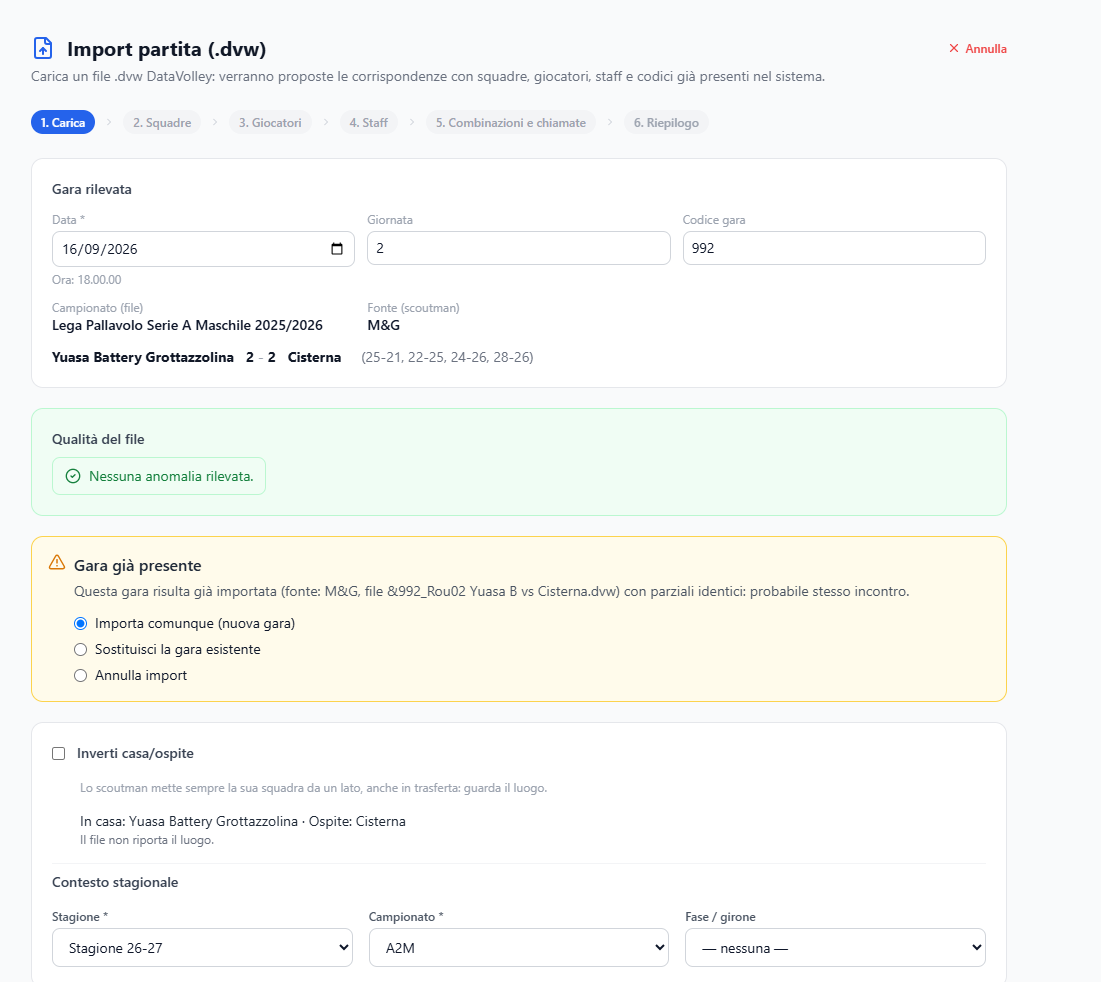
1. Upload — the area where you drop the .dvw file (or click to pick it). After the analysis, the detected match appears: date, round and match code, taken from the file and editable, then the championship as written in the file and the scout. The fields the file does not have are highlighted: those are the ones to fill in. And the File quality box: total lines, interpreted lines, discarded lines, validated sets.
2. Teams — for each side, the name exactly as it is in the file, and the choice: use an existing team or create a new one.
3. Players and 4. Staff — the same matching for people.
5. Attack combinations and calls — the scout's codes compared with the club's lists.
6. Summary — what is about to be written, before it is written.
Still in step 1, below the detected match, who is at home: the venue written in the file and the proposal that comes from it, or — if the championship has the official schedule — the schedule match the file hooks onto.
In step 2, when a team is recognised, a line says from what: the DataVolley code, the name it has in this season, a file already imported, the name it had in another season, or a similar name («check it is the right one»). At the top of the drop-down, «Most similar»; next to each team, its club. If the team is new, you choose which club it belongs to and its type.
What you can do
- Fill in date, round and match code when the file does not have them, or correct them. The date is mandatory; round and code stay empty when they do not exist, as in a friendly.
- Correct the season context: season, championship, phase or pool — these are the fields that will filter every analysis afterwards.
- Swap home and away: the scout always puts their own team on the same side, even away from home. Look at the venue, and put it right here.
- Decide what to do with a match that is already there: import it as a new one, replace the existing one, or cancel.
- Link people to existing records instead of creating new ones.
- Import a whole folder with «Import a whole folder →»: see Queued import.
Good to know
- Without a date you cannot go on. A match without a date would stay out of trends, periods and sorted lists: if the file does not have it, or writes it in a way that cannot be read, it is entered in the first step. A round «0» counts as no round.
- What you type by hand stays: re-importing from the archived file, from the Matches page, also keeps the date, round and match code entered here.
- In Data quality the finding about incomplete match data does not appear for a field you filled in here: the file still lacks it, the MIA match has it.
- Recognising matches that are already imported does not look at the file but at the content: same date, same teams, same set scores. That is why it also recognises a corrected file, or one with the sides swapped. If the recorded match has a different date, the warning says so.
- A team with a different sponsor is not a new team. If the file uses this year's name and the registry has last year's, choose «Use existing team»: this season's name is recorded by itself, and from the next file on it is recognised. See Teams.
- With the official schedule, home team, date, round and match number come from the schedule. If home and away in the file are the other way round, the match is not hooked and the warning says so: swap the sides.
- A code it does not recognise must be matched to an entry of the club's list, or created: otherwise that code stays out of the statistics by combination or by call. If it happens anyway — a code used in the actions but missing from the file's list — the actions turn up in Configuration → Scout, in the «Actions without a canonical entry» box.
- Discarded lines are not an error in themselves: the files contain lines that do not describe touches. If there are many, though, it is worth looking at Data quality before trusting the statistics.